Accessible chart color is a system of decisions, not a list of hex codes. A palette can be attractive and still fail if readers cannot identify a series, distinguish a highlighted value, or read a small label.
Start by deciding what color means. Then make sure the same information is available without color, inspect the chart against its real background, and provide the data in a usable alternative form. This guide is a practical design workflow, not a claim of WCAG conformance.
Match the palette to the data
Three common jobs need different approaches:
| Color job | Example | Useful approach |
|---|---|---|
| Distinguish named groups | Three product lines | Separate categorical hues, with direct names |
| Show increasing magnitude | Counts by district | Ordered light-to-dark sequence, with values or a scale |
| Show direction around a meaningful midpoint | Difference from a target | Diverging sequence with a labeled midpoint |
Do not use a diverging palette merely because two colors look good together. If zero is not a meaningful center, the palette can imply a distinction your data does not contain. Likewise, evenly spaced categories should not look like a numerical progression unless they actually are ordered.
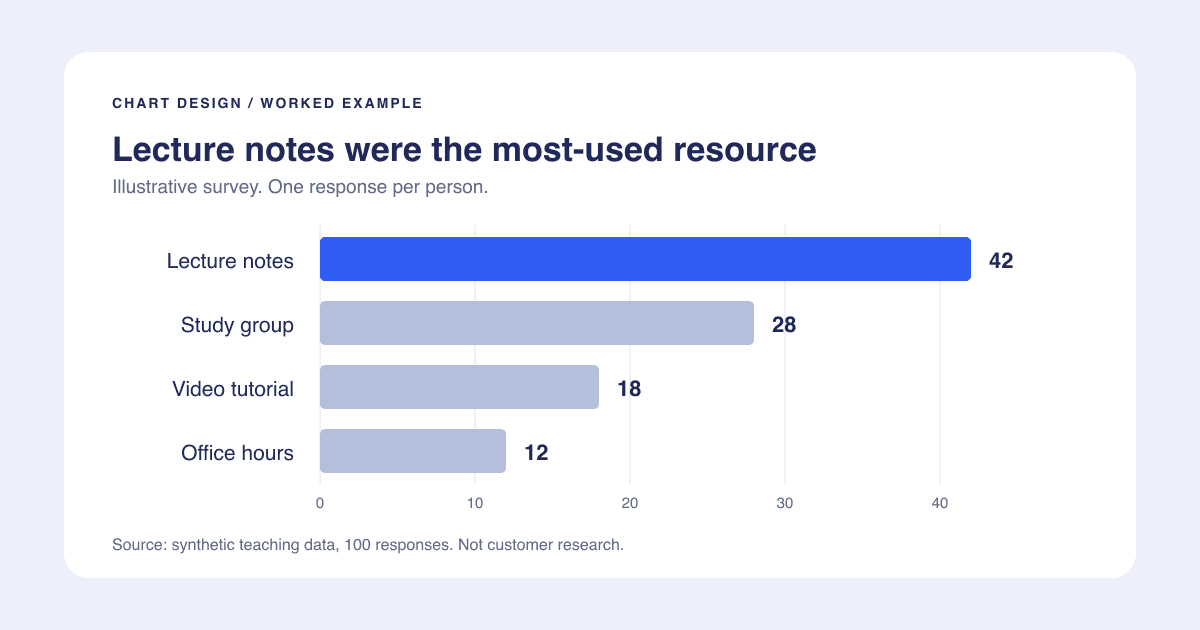
For a single-series bar chart, one accent and neutral comparison bars are often enough. The chart design checklist uses an illustrative 100-response survey: lecture notes 42, study group 28, video tutorial 18, and office hours 12. You can download those rows to try different treatments.
Make identity survive without color
Imagine a line chart with three product groups. A legend says the groups are blue, orange, and purple, but the lines cross. A reader must repeatedly trace each line to its legend key. That is difficult even before considering color-vision differences or a grayscale printout.
Put each series name near its endpoint where space permits. Add distinct line styles or markers if the charting tool supports them. If labels collide, separate the groups into aligned small charts instead of forcing them into one plot. For bars, keep category labels visible and identify the highlighted category in the text.
WCAG's use-of-color guidance requires another visual means of conveying information that color communicates. In practice, naming the series or labeling a threshold is more useful than telling someone to "look at the green line."
Check text contrast separately
Axis labels, titles, and annotations are text. Pale gray type on a white slide can disappear even when the bars look strong. WCAG's minimum text-contrast criterion uses 4.5:1 for normal text and 3:1 for large text, with specific definitions and exceptions; see the primary guidance.
Check the actual foreground and background colors. A text color that works on a white canvas may not work when placed inside a dark bar. Check annotations and legend text too, not just the main title. These ratios describe text requirements, not a universal pass/fail ratio for every chart mark.
If a palette tool says a combination passes, still inspect the final image at its destination. The tool cannot know whether labels overlap, whether an important line is too thin, or whether your screenshot was resized until all text became tiny.
Run a practical stress test
- View the chart at the size it will appear in the report or slide.
- Inspect a grayscale version. Can you still identify groups and the main comparison?
- Try color-vision simulation as a diagnostic, not as proof of universal accessibility.
- Read the chart without using color names in your explanation.
- Check the exported file on its actual light or dark destination background.
When the test fails, fix the encoding before hunting for a different palette. Direct labels, a less crowded layout, or separate panels can solve problems that swapping blue for teal cannot.
Include the information outside the image
A chart image does not expose all its data to someone using a screen reader. Provide a short identification plus an adjacent explanation of the important pattern, and a data table when readers need the values. W3C's guidance for complex images describes these complementary alternatives.
For the survey example, a useful explanation is: "Lecture notes were selected most often, with 42 of 100 responses; office hours were selected least often, with 12." The four-row table supplies the rest. This does not establish which resource improves learning, and the description should not claim that it does.
Use the color palette utility to explore options, then apply these checks. Continue with chart titles that communicate the evidence, rather than asking color alone to tell the story.